
Table of Contents
SMS for Doctors
A medical facility generally needs to use varied methods of communication. Phone, voicemail, email, sms, name it and you will find a use for it. Given how intricate communication in a healthcare setting is, choosing the correct HIPAA Compliant channels for medical communication is of utmost importance.
One particular channel that stands out when it comes to instant communication is secure/encrypted SMS.
Using SMS for doctors’ offices can give great results! From connecting with staff for inter-team communication to engaging with patients, using SMS for the doctor’s office can have a significant impact on business operations and key business metrics like patient engagement, review generation, reducing no-shows, patient retention, etc. Let’s have a look at what exactly is sms for doctors and how you can implement it at your practice.
What is SMS for Doctors?
SMS for doctors is essentially the use of SMS as a communication channel in a healthcare setting. There are two broad methods by which SMS for doctors can be used. These are
i) For doctor-staff communication
ii) For doctor-patient communication
Before we jump into how you can use SMS in each of these scenarios, let’s look at why SMS is the best medium for medical communication.
Why use SMS for Doctors?
- It is the preferred mode of communication: A recent study revealed that patients prefer to receive health communication over text more as opposed to phone calls. Text messaging is less intrusive and thus proves to be a preferable mode of communication.
- It reduces the number of phone calls received: Your staff will be able to breathe a sigh of relief as more patients prefer to text than call. 2-way encrypted text messaging enables patients to text for queries, appointments, rescheduling etc. This will significantly lessen the load on the number of calls being received at your practice.
- Scale efficiently: As your clinic attracts more and more patients, the number of patients trying to contact you will increase. An increase in call volume cannot be handled every time by hiring more staff. Instead allowing patients multiple channels of communication such as texting, Email etc. will help you scale efficiently whilst reducing costs. One important thing to factor in is that SMS has an open rate of 98%, so it can be a great substitute for calling.
- Saves time: On-call resolution takes a longer time as compared to texts. The quick and easy nature of texting means that queries will be resolved quicker. Lesser call burden means your staff has more time to focus on other tasks!
And if you are wondering how SMS compares to other channels, here’s a comparison table that will help you see why it’s the better option:
SMS | Phone | ||
Open Rate | 98% | 20% | Depends highly on the recipient’s availability, preferences, and relationship with the caller |
Reach and Accessibility | Widely accessible | Accessible given internet connection is available | Dependent on the recipient’s availability and network coverage |
Speed and Immediacy | Faster, near-instantaneous | Slower, asynchronous | Faster, real-time |
SMS for Doctor and Staff Communication
#1. Send urgent notifications: In emergency situations, instant communication with the team is required. Whether it be notifying doctors for rapid response calls, sending urgent updates regarding a patient’s treatment, or communicating important information during emergencies/natural disasters, SMS can be a great tool to ensure instant delivery of the message. Here is a template you can use:
“Urgent Notification: Attention all doctors/staff. Immediate action required regarding [brief description]. Please gather in [location] for an emergency meeting at [time]. Your prompt presence is crucial. Thank you.”
#2. Shift Reminders and Updates: Keeping the staff in the loop regarding their shift timings and other updates can also be effectively achieved through SMS. You can send reminders to the staff about upcoming shifts or changes in the shift. SMS can also be used to communicate shift assignments and reassignments. You may also leverage the power of automation for shift reminder purposes. You can set up automation in such a way that whenever a slot opens up for a shift, all team members are sent an update. This way the system can keep running without manual intervention. Here are some templates you can use:
Your upcoming shift at [Hospital/Department] is tomorrow from [Shift Time]. Please ensure your timely presence. Thank you.
Your shift at [Hospital/Department] has been rescheduled to [New Shift Time]. Please adjust your schedule accordingly. Thank you.
You are assigned to work at [Hospital/Department] on [Date] from [Shift Time]. Please confirm your availability. Thank you.
Your shift at [Hospital/Department] on [Date] has been reassigned. Please disregard the previous schedule. Thank you.
#3. Collaborative decision-making: SMS can also be used to quickly communicate for collective decision-making among doctors and staff members.
We invite you to participate in a collaborative decision-making process at [Hospital/Department]. Meeting on [Date] at [Time]. Your valuable input is vital. Thank you.
#4. Administrative communication: You can send instant updates about new administrative policies, deadlines for documentation work, and performance evaluations through SMS.
Effective immediately, a new administrative policy has been implemented at [Hospital/Department]. Please review the details provided via email or on the intranet. Thank you for your cooperation.
Friendly reminder, the deadline for submitting all staff documentation is approaching. Please ensure all necessary paperwork is completed and submitted by [Deadline Date]. Thank you for your prompt attention to this matter.
We would like to inform you that your performance evaluation is scheduled for [Date]. Please prepare any necessary documentation or supporting materials. Your active participation is appreciated. Thank you
However, one thing to note here is that if communication entails details about a patient’s health information, it is necessary to ascertain that HIPAA compliance is maintained.
Learn how you can use Emitrr’s texting features for doctor and staff communication here:
SMS for Doctor and Patient Communication
Using SMS for doctor and patient communication can help improve patient engagement levels. A better patient journey can also be expected when patients have an easy medium to communicate with their providers every step of the way. Following are some use cases of SMS for doctor and patient communication.
#1. Appointment scheduling: SMS is a great channel to engage patients and have them schedule an appointment. Patients may call the clinic or visit the practice website to book an appointment. However, there is a possibility that their calls go unattended or a lack of internet connectivity makes the appointment scheduling attempt void, in such cases engaging the patients through text can definitely prove beneficial.
Scenario 1: Patient calls, but no one attends. In this case, sending an immediate follow-up text can help engage the customer. If their calling intent was scheduling an appointment, simply include a link to appointment scheduling in the text.
Scenario 2: Patients were inquiring on the website’s chat widget but lost connectivity. To engage these patients, you could make it mandatory to have them submit their phone numbers. If and when the conversation stops due to a lack of internet connection, you can simply continue the conversation by text!
Here are some text templates you could use:
Hello! We would like to schedule an appointment for you at [Hospital/Department]. Please reply with your preferred date and time, or call [Contact Number] to coordinate a convenient appointment. Thank you!
Hi, if you wish to schedule an appointment with [Practice Name], follow this link [Link].
Sorry, we missed your call. If you wish to schedule an appointment with [Practice Name], follow this link: [Link]
#2. Appointment reminders: After the patient has scheduled their appointment, reminding them to keep up with it, is the clinic’s responsibility.
Did you know?
The total cost of missed healthcare appointments in the United States every year is an astronomical $150 billion. Each open, unused time slot costs a physician 60 minutes and $200 on average.
A sure-shot way to ensure the visibility of appointment reminders is by sending them via text. Text appointment reminders can be automated in such a way that they are sent according to each patient’s appointment date along with setting the cadence of the appointment reminders.
Did you know?
A study published in the Journal of Medical Systems found that appointment reminders through automated phone calls or text messages led to a 36% reduction in no-show rates in a primary care setting. Another study conducted by a dental clinic reported a reduction of 50% in no-shows after implementing text message reminders.
Here is a template you could use:
Hi {{patientname}}, this is to remind you that you have an upcoming appointment at {{clinicname}} on {{date}} {{time}. If you wish to reschedule your appointment press C.
#3. General Updates: After the patient has had an appointment with the doctor, you can use texting to send them treatment plans they should follow, lifestyle tips, general medical information, etc. If texting is 2-way then patients can also clear any doubts they might have and engage more effectively with their providers. These general updates can be a great way to way to keep engaging your patients at regular intervals. You can also leverage the 2-way texting feature to receive patient referrals or even refer doctors to patients.
Here are some templates you can use:
Lifestyle Tips: Stay active! Aim for at least 30 minutes of exercise daily to boost your energy and improve overall health.
Lifestyle Tips: Prioritize sleep; aim for 7-9 hours of quality rest each night to rejuvenate your body and mind.
Your personalized treatment plan is ready. Visit [Hospital/Department] or call [Contact Number] to collect. Thank you for entrusting us with your care. [Your Name]
#4. Sending Intake forms: Healthcare providers can enhance the patient journey by allowing the patients to save time. The number one time-consuming task in a healthcare practice is filling out the patient intake form. To avoid this time-consuming step, providers can send a text message to the patients containing a link to the patient intake form. This way patients can fill up the patient intake form even before coming to the practice and hence save a lot of time. These intake forms can also be integrated with your clinic’s EHR. This way the forms can become easily accessible in one place along with all important patient data. Here is a template you can use:
Please complete the patient intake form prior to your visit. The form can be accessed at [Form Link]. Thank you for your cooperation.
#5. Surveys: Surveys can be sent to patients using text. Surveys plan an important role in determining how well the practice is functioning and understanding whether the patients are satisfied with the service they receive. There are two ways to deliver surveys on text.
i) You can send a text message containing a link to the survey.
ii) You can engage in two-way communication with one question asked at a time.
Here is a template you can use:
We kindly request your participation in a brief survey regarding your recent visit. Your feedback is valuable. Please complete the survey at [Survey Link]. Thank you for your time and input.
#6. Review Requests: One should also utilize SMS for doctor and patient communication for review requests. We all know how important building an online reputation is nowadays. Most patients who want to finalize a healthcare practice first look it up on the internet, ascertain its credibility through other patient reviews, and then book an appointment. Therefore it is necessary for healthcare practices to have credible reviews on all required review platforms. The best way to collect these reviews is just by asking your existing patients for reviews. And the best method to implement it is through SMS.
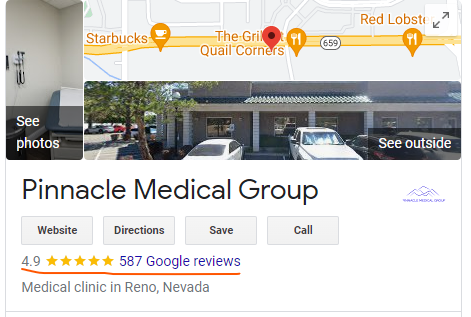
For example, one of Emitrr’s customers Pinnacle Medical was able to see an increase of 500% in their reviews just by automating the entire process review request process through text. When they started with Emitrr they had a total of 9 reviews.
#7. Mass texting: As we discussed in the section for doctor staff communication, mass texting can also be used to send broadcast messages to patients! Emergency alerts, policy updates, general health information, etc can all be sent as a mass text blast using the mass texting feature. Here is a template:
Experience exceptional care at our state-of-the-art hospital. Expert doctors, advanced technology, and compassionate staff ensure your well-being. Your health is our priority. Visit us today!
Learn how you can use Emitrr’s texting features for doctor and patient communication:
How can Emitrr help implement SMS for doctors?
Whether it be SMS for doctor and patient communication or SMS for doctor and staff communication, Emitrr has got the features for it! Let’s have a look at some of the features and how you can use these features to implement the use cases we discussed above.
- Group texting: The group texting allows one to add members to a group to facilitate group texting. Here each member is added on a single thread. Each message sent in the group can be viewed by everyone and every member can reply to the group message. The group texting feature is a great way for team members to communicate with each other. If you wish you can create different groups for different departments and share updates on the group. Group texting can be used for the following use cases: Send urgent notifications, Shift reminders and updates, collaborative decision-making, and administrative communication.
- Mass texting: Mass texting allows you to create a campaign where you can create a common message that will be sent to the list of contacts you upload. The difference with mass texting is that the common message will be sent to each of the recipients individually on a thread between the sender and a single recipient. So ‘n’ number of threads between sender and individual recipients will be created. You can use the mass texting feature in the following use cases: General Updates, Promotional messages, and Urgent notifications and alerts.
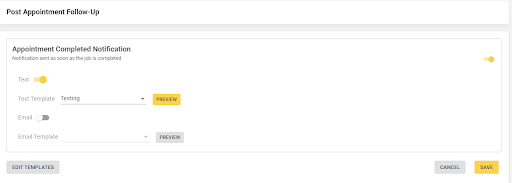
- Automated text campaigns: Automated text campaigns allow senders to send messages as soon as an event happens. For example, a post-appointment follow-up automation can be created that allows providers to get in touch with the patients after the appointment. It has the option of sending a text follow-up or an email follow-up as well. Emitrr can integrate with your EHR thus allowing you to send automated campaigns. Automated text campaigns can be used for the following use cases: appointment reminders, and Post appointment follow-ups.
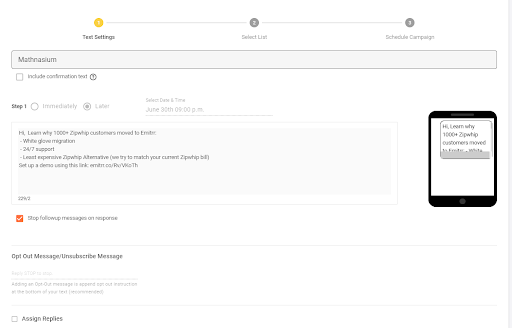
- Manual Text campaigns: The manual text campaigns feature allows you to set up text messages along with follow-up texts. You can decide on the number of follow-up texts you want to send and schedule the date and time for all of the text messages. The manual text campaigns feature can be used for the following use cases: Appointment Reminders, Sending surveys, promotional messages, and review requests
- Surveys: The survey feature allows you to create surveys on the Emitrr platform and obtain the link for the survey you created. This link can then be added in a text message campaign and delivered to the patients.
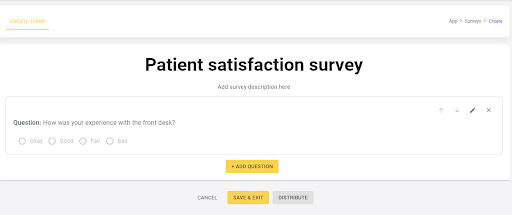

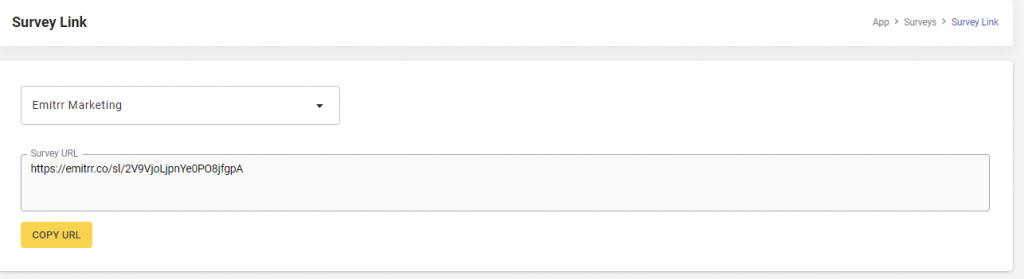
- Forms: Emitrr’s form feature allows you to create medical forms. The platform is made such that you will be able to drag and drop elements as you wish and create the form.
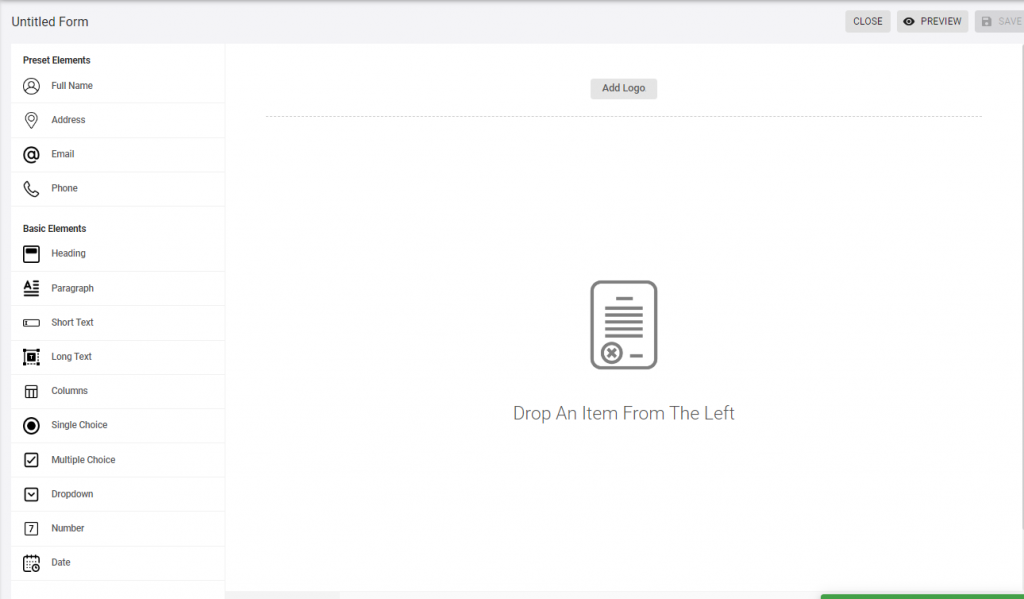
Once you’ve created the form you can save it and have it delivered to the respective patients. In Emitrr under the forms section, you will find a column named ‘requests’. Upon selecting requests you will be able to request patients to fill the intended form.
Have a look at this video to learn more:
How to select the right SMS platform for your clinic?
Now that you are aware of the multiple pros of using SMS for doctor and patient/staff communication, you would want to move to the next step, which is finalizing an SMS platform. The features discussed in the above sections are without a doubt, important for smooth communication. Other than that, these are some of the things you should keep in mind while finalizing a texting platform for your office:
1. Make sure it has team collaboration capabilities: An ideal texting platform will be that which allows basic access to all team members and allows them to collaborate to deliver the best results. Team collaboration capabilities such as the assignment of conversations, round-robin allocation, conversation folders, private notes, etc can help assign conversations to members in an efficient manner. Folderizing conversions can make it easy for team members to access specific conversations.
2. Make sure it has productivity capabilities: SMS communication can be done seamlessly through some complimentary productivity capabilities. Some of these capabilities include the ability to schedule messages, apply bulk actions (such as delete, send, etc), personalize text messages according to the customer, voicemail to text, auto-replies when communication is received after business hours, language translation, etc to name a few.
3. Track user-level metrics: Tracking user-level metrics such as the number of messages sent, replies received, calls attended, conversations assigned, etc can help you get some serious insights into your communication process.
SMS and HIPAA compliance
While SMS is a great tool for instant communication in healthcare, it is imperative to remember that such communication often involves sensitive and private information such as PHI. PHI is subjected to specific rules and regulations to ensure its confidentiality, integrity, and availability, and thus SMS needs to follow HIPAA compliance rules to ensure the safety of PHI.
The HIPAA compliance rules that must be followed for safe SMS communication include:
- Encryption: Encryption ensures that no one apart from the sender and the receiver is able to access the message being transmitted. Encryption generated private security keys whose access is in the hands of only the sender and receiver. This is the only way texting can become secure. Hence only encrypted text messaging platforms should be used for communication.
- Business Associate Agreement (BAA): If you are using an SMS service provider or a third-party vendor to handle SMS communications that involve PHI, you must have a signed Business Associate Agreement (BAA) in place. The BAA outlines the responsibilities and obligations of both parties regarding the protection of PHI.
- User Authentication and Access Controls: Strong user authentication mechanisms, such as passwords or two-factor authentication, should be implemented to control access to SMS systems and ensure that only authorized individuals can send or receive PHI. Specific text capabilities should be accessed by only an authorized set of people. For example, voicemail recordings and transcriptions should not be accessible centrally.
- Message content: Care should be taken while curating a text message to ensure that no sensitive or identifiable health information is transferred.
- User-based notifications: If you have a multi-location practice, you probably will have multiple users accessing your SMS platform. To ensure privacy and confidentiality within each location, notifications should be structured for specific users only. A team member in say location A, should not get notifications for location B and vice versa.
- Notifications should not contain the content of the messages: Whether it be email notifications, text notifications, or notifications on the texting platform, you will need to ensure that notification previews do not include the content of the message as they can violate the privacy and security of the patient.
With Emitrr, for example, HIPAA compliance is ensured while texting through the secure texting option.
Once you turn on the secure texting option on Emitrr, the recipient is sent a secure texting link. Once they click on the link it leads them to a portal where they can securely chat ensuring all HIPAA compliance is maintained. So providers no longer need to worry about whether their communications are HIPAA compliant or not.

Conclusion
SMS can be a very powerful tool in the doctor’s office. From communicating with staff to communicating with patients, SMS can help facilitate smooth conversations due to its versatile nature and the fact that nearly everyone has access to a mobile phone. Since SMS is independent of the internet, it helps ensure that everyone receives the message without an active internet connection.
Embracing SMS can help improve patient engagement and curate a smooth patient journey. The least intrusive nature of SMS along with its 99% open rate makes it the most formidable communication tool in the healthcare industry.
From scheduling appointments to recalling patients for regular checkups, everything can be achieved with SMS for doctor and patient communication.
SMS for doctor and staff communication is also a great option to send instant alerts and notifications such as shift assignments, policy updates, emergency announcements, etc. The group texting feature is another great way to keep staff in the loop using a single communication thread!

 4.9 (400+
reviews)
4.9 (400+
reviews)