HIPAA-compliant forms are user-completed digital forms that are used to securely collect patient health information (PHI). But what exactly is Patient Health information? It is every bit of information that identifies an individual patient as a part of the healthcare process. It includes the medical records of the patient, doctor’s notes, billing information, etc. It is required to be private and safeguarded from unauthorized access.
There are some HIPAA mandates that one needs to adhere to in order to have your digital forms qualify as a secure medium for sharing sensitive patient information. Here are the top 5 requirements that qualify a form to be HIPAA-compliant.
Patient data should only be accessed by authorized personnel to ensure risk mitigation and enhanced efficiency.
Data should be transferred only between trusted sources and must be encrypted.
Patient information must be stored in an encrypted form.
Patient information should be backed up in case of emergencies.
Any data that is no longer needed must be deleted permanently to avoid if from falling into the wrong hands.
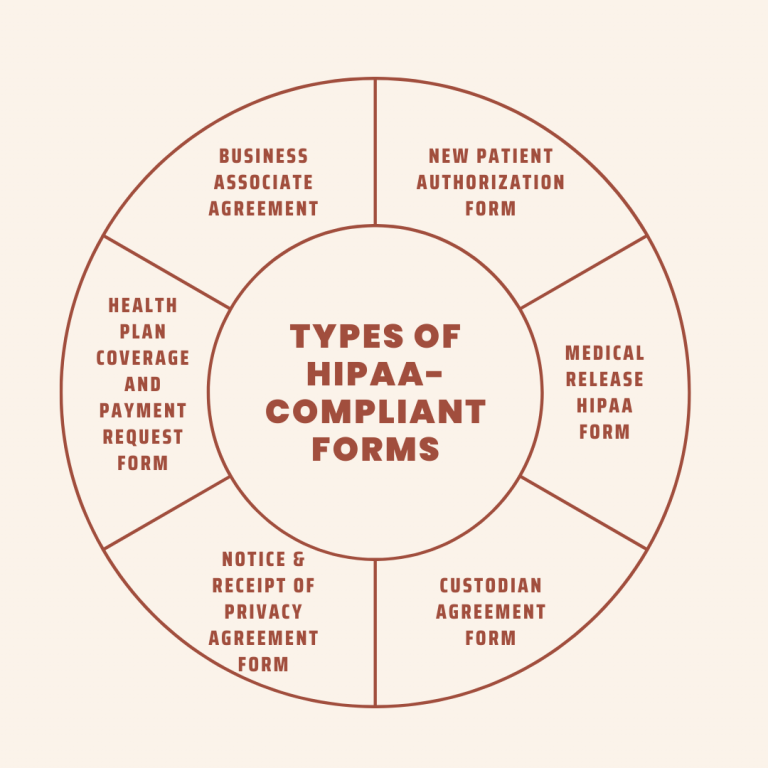
Types Of HIPAA-Compliant Forms
Business Associate Agreement
To enable the exchange of ePHI, the Business Associates need to sign a contractual agreement called the Business Associate Agreement with the Covered Entity. Both groups need to adhere to HIPAA regulations to protect patient data. This written authorization ensures HIPAA compliance and keeps Patient Health Information secure. If the form isn’t signed, then either of the parties can face hefty fines especially if the PHI is mishandled.
New Patient Authorisation HIPAA Compliant Form
This is a standard, HIPAA-compliant patient information form that includes basic information pertaining to insurance and communication preferences. It is quite useful for verifying the insurance coverage of the patient.
Medical Release HIPAA Compliant Form
This is a need-to-know basis form that requires the consent of the patient for the information to be sent to various parties. These could be:
Required by a party for marketing purposes, highlighting the patient’s recovery story
Required by the physician who is leaving the organization but continues to treat the patient
Custodian Agreement HIPAA Compliant Form
This form is signed by the Physician in case he is leaving the organization and taking the patient information to another organization. This form states the usage and storage of patient information being transferred from the covered entity to another organization.
Notice and Receipt of Privacy Agreement HIPAA Compliant Form
This form is an acknowledgement of the privacy agreement with respect to PHI and it demonstrates the way the organization complies with the HIPAA guidelines. The form states that the organization prioritizes safeguarding patient information and the fact that patients can access the same if required. This form proves useful during an audit and in the case of proving compliance.
Health Plan Coverage and Payment Request HIPAA Compliant Form
This form allows organizations to build records of two things: the patient’s financial responsibilities and insurance eligibility. It must include the policies of the organization in case the patient misses an appointment or the insurance provider fails to cover the insurance. This form offers a secure platform for sending payment requests and receiving payments seamlessly.
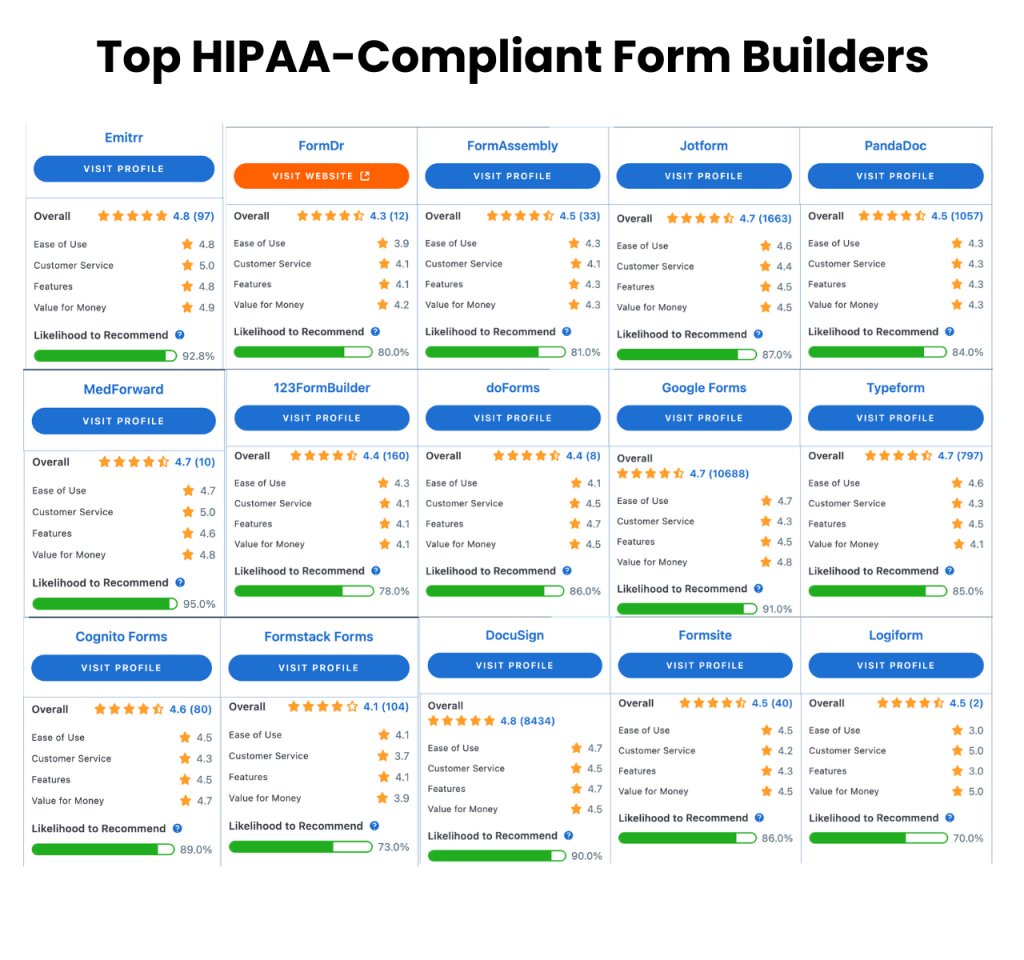
Emitrr is a great HIPAA-compliant form builder that allows you to keep a track of your patients by building a secure database. From organizing data to analyzing it, you can use this form builder to your advantage and also create your patient intake forms with utter ease. You can customize the forms, generate live reports, and even automate approvals with this form-builder. Emitrr allows the streamlining of workflows and also offers secure data collection.
To start off you will be able to create a patient intake form very easily using the intended form fields. You can mark the fields as required according to your need. No coding will be required to build a HIPAA-compliant form. Conditional logic forms will allow the patient to fill in information easily. The autocomplete feature will help the patients by auto-filling repetitive fields and saving time. The submissions of the forms will also be HIPAA compliant as patients sign and submit forms securely to their online account.
Another interesting functionality that Emitrr offers is the digitization of paper forms. If you have trouble getting forms filled out by your patients and are ending up spending a lot of time scanning, uploading, and updating forms; you can digitize this entire process.
Google Forms
There are two types of Google forms: Standard and HIPAA-compliant one. The standard Google form is not HIPAA compliant. To obtain a HIPAA-compliant Google form you need to sign a business associate agreement with Google along with changing security and privacy settings on the account to safeguard PHI.
If you’re looking forward to adding YouTube videos or images to your HIPAA-compliant forms, Google Forms is the right form builder for you. It is free of cost and it allows you to organize and analyse data properly. With Google Forms, you can also export the data to a Google sheet. Choose from a variety of themes and options to design your patient intake form and provide your users with a seamless experience with Google Forms.
DocuSign
A part of the Microsoft Office 365 Suite, DocuSign allows you to create user-friendly forms with different templates and design options. With this HIPAA-compliant form, you can easily collect patient feedback. The form is easy in the sense that you get recommendations with respect to creating your forms. The AI feature in this form is quite refined and allows you to prepare your forms in less than 10 minutes.
Nexhealth
If you want to create easy-to-use forms for patient intake, authorization, medical history, and consent; Nexhealth is a great option to pick. With its capabilities, you can easily digitize existing forms and create new ones, eliminating double data entry. This is because of two-way integration with its EHR and practice management systems.
JotForm
JotForm is another excellent HIPAA-compliant form builder that helps you securely collect PHI. With this form builder, you can collect patient feedback, receive payments, manage employee applications, centralize patient health data, schedule appointments, obtain signatures, and even get patients’ consent.
Formsite
With Formsite, you can easily create mobile-friendly forms that can be easily embedded with your website as well. Use this form builder to create appealing and responsive forms, thereby seamlessly collecting and managing PHI. With a hundred templates and 40 question types to pick from, you’ll be spoiled for choice while creating your forms.
FormAssembly
FormAssembly allows secure data collection services while also meeting HIPAA-compliant standards. Its drag-and-drop form creator is what does the magic, and is also responsive across devices and browsers. Such a form builder is ideal for both covered entities and business associates.
Formstack
Are you looking for a form builder that helps you design branded forms? Formstack is what you need. With this user-friendly, HIPAA-compliant form builder, you can easily create forms to collect patient information, without having to incorporate coding. Just pick a template and create beautiful and comprehensive forms.
Typeform
Design quizzes, obtain patient feedback, and create polls with this form builder, while also incorporating GIFs and custom forms to add to its visual appeal. You can also easily analyse all the acquired data by integrating your form with all the tools.
LuxSci
LuxSci is a HIPAA-compliant form builder that allows for the seamless collection and storage of sensitive patient information. The secure form feature is a part of their email and web services solutions that offers a safe collection of data in flexible file formats and storage in multiple locations to ensure smooth workflow.
PandaDoc
Panda Doc allows you to separately store and collect patient and staff data by utilising different workspaces, also offering an additional 14-day free trial. With this form builder, you can ensure convenience for your patient and staff by allowing efficient collection and storage of staff and patient information.
Logiforms
Logiforms is a great form builder with which you can design, distribute, and host online forms in a couple of minutes. With this form, you can automate your business’ workflow as you create feature-rich forms. You can choose from over 150 templates and customise those as per your requirements to create intelligent forms.
Cognito Forms
With Cognito Forms, you can create user-friendly HIPAA-compliant forms through the drag-and-drop feature and customise them as per your needs. You can also use this platform to create custom views and also receive email notifications in order to manage your workflow.
FormDr
If you seek to achieve maximum operational efficiency and streamline your workflow, then you need FormDr, which helps you create new forms, and also combines multiple forms into one single form bundle. Not only that, but you can also convert your PDFs, Word documents, and paper documents into HIPAA-compliant forms.
DoForms
A mobile-friendly form builder, DoForms caters to the healthcare industry in particular, offering a secure method to collect patient data. It integrates with PowerBI to build and analyse web dashboards, while also allowing to search patient data through Microsoft’s multi-factor authentication.
Medforward
Medforward is a great HIPAA-compliant form builder that focuses on improving patient intake processes by making form submission easier. This form builder allows for easy submission, also allowing the addition of forms to the website without having to install a particular software.
123 Form Builder
This form builder is perfect for those who want to send real-time alerts to multiple staff-centric devices in order to deliver a sound customer experience. With this form builder, you can reduce the patient wait time and ensure sound movement throughout the stages of patient care.
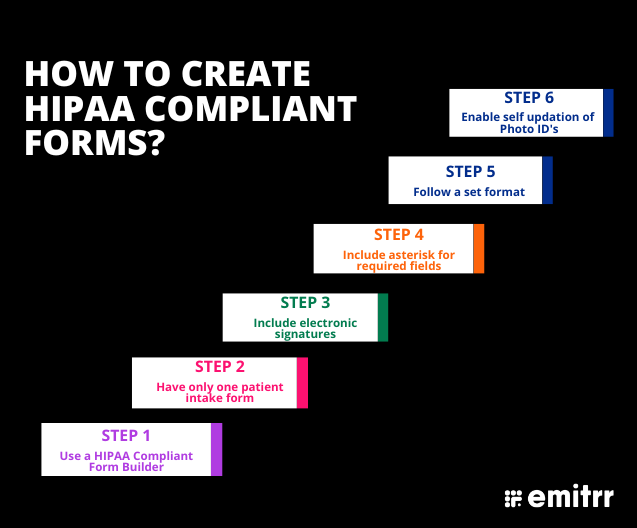
How To Create HIPAA-Compliant Forms?
To ensure you have received accurate data, it is important that you create effective HIPAA-compliant forms. Here are some tips to create HIPAA-Compliant forms:
Use a HIPAA-Compliant form builder
Considering the fact that confidentiality is an important factor that you have to keep in mind while collecting patient information, a HIPAA-compliant form builder is an excellent strategy to implement. With the form builder, you can collect the relevant information and share it with authorized parties. Speaking of authorized parties, what are they?
Well, authorized parties are broadly two groups that need to comply with the HIPAA regulations: business associates and covered entities.
Covered entities are the people/groups/organizations that collect, analyze, and transfer Patient Health Information electronically to authorized personnel. Healthcare providers, health insurance companies, healthcare clearing houses, and healthcare maintenance organizations fall under this category.
Business associates, on the other hand, are on the receiving end of the ePHI and are bound by a contract with the Covered entities. Email hosting services, form builders, and IT providers are classified as Business Associates. Your form builder must comply with the HIPAA guidelines in order to ensure that the patient data that is being collected and shared is protected.
Have only one patient intake HIPAA-compliant form
While onboarding a patient, you need to make sure that the process is convenient for the patient. When you send your patient intake form, make sure all your questions are covered in that one form. But do not make it too detailed unnecessarily. Instead, divide the form into different sections and allow the patient to fill it at their ease. By doing so, you will be able to receive accurate information, without overwhelming your patient with a storm of questions at once.
Include electronic signatures on your HIPAA-compliant forms
With this feature, patients can easily scan through all the information that they input and give their consent with their signatures. Doing so will save time, both on your as well as your patient’s end and you can proceed with the treatment as soon as the patient steps into the clinic.
The asterisk (*) is key
To ensure that you receive complete information for a proper health diagnosis, mark the important fields as ‘required’. Since the form cannot be submitted without filling in the required fields, you will receive everything you need to help your patient immediately.
Have a specific format to avoid confusion
In order to avoid discrepancies in your forms, you can have a specific format in some of the questions to make sure that your patients aren’t confused and enter the correct information.
For example, when you ask for the date of birth, there can be varied interpretations of the same, and they can either be written in DD/MM/YYYY format or MM/DD/YYYY format. When a patient enters such information in the latter format, it becomes confusing. So, have a set format for such fields where there might be a possibility of error.
Set up auto-completion
Why annoy patients with re-entering details that have already been given? Instead, imply conditional logic in your HIPAA-compliant forms to remove redundancy and enhance user experience.
For example, if the patient has already availed treatment from you once and is being onboarded again, make sure that the patient does need not to fill in all the basic details again.
Enable self-updation of photo IDs
When you onboard your patients through your HIPAA-compliant forms, always ask for soft copies of their IDs. Doing so will help you go through everything before the patient visits you, and will give you the bandwidth to perform a thorough diagnosis.
Common FAQs Pertaining To HIPAA-Compliant Forms
What is the cost of HIPAA-compliant form builders? It depends on the form builder that you are opting for. While some form builders are free of cost, the others go up to even $249 monthly. So, be sure of the kind of form builder you need before investing your money.
Do patients need to sign HIPAA-compliant forms? Patients are not legally obliged to sign forms, so there is no need for them to sign.
What if a form isn’t HIPAA-compliant Any negligence in this respect from either of the parties can invite a fine ranging between $100 to $50000, depending upon the kind of violation.
Conclusion
As a healthcare provider, not only do you need to provide excellent care to your patients, but also make sure that all the patient information that you collect or store digitally is safe from any data breach. If shared, make sure it is HIPAA-compliant by using the relevant form builders. So, comply with all the HIPAA guidelines and do not compromise patient data at any cost.






 4.9 (400+
reviews)
4.9 (400+
reviews)