Remember the last time you looked up a business online? You probably wanted to visit a restaurant or wanted to avail a certain service. What was the first thing you looked up? After getting the results of the desired business you probably went straight to its review sections. There are many review platforms out there, which ones are the most popular? Following a Google search, the first platform that you would see a review on is probably Google itself. After Google, Facebook takes precedence over other review platforms due to its wide reach. To give you a little perspective, Facebook allows over 1.6 Billion people worldwide to be connected to a small business. As a business owner, you want to give your customers the freedom to express their thoughts about their experience with your business. It establishes a sense of trust and transparency. So how do you ensure that your customers are reviewing you on Facebook? You can tell your customers to follow these steps to leave a review.
You can write a Facebook review by following 5 steps
How to write a review on Facebook in 5 steps:
Open the Facebook page of the business you wish to write a review for
Go to the top left corner of the page, and click on ‘Reviews’.
Under the current rating of the business, you will find a box that asks whether you would recommend the business.
Select either yes or no according to your experience
A pop box will appear where you will be asked to explain in detail why wish to recommend or not recommend the business
Once done click ‘Post’.
Can you turn off Reviews for your page?
Yes, you can turn off reviews for your Facebook page. With the recent Facebook page updates, the business page experience has significantly changed. Now, if one is a page admin they can switch between their own profile view and a page view. In other words, your business page now has its own Facebook profile. To turn off reviews follow these steps:
Switch to the business page profile
Go to the business profile image/icon on the top right corner
3. From the drop-down menu select ‘Settings and Privacy’> ‘Settings’
4. From the left-hand side, navigation menu select ‘Privacy’
5. Select ‘ Page and Tagging’
6. Under the page and tagging section toggle off ‘Allow others to view and leave reviews on your Page”
Alternatively, you can also follow these steps:
Open your Facebook page profile
Navigate to the three dots ‘ … ‘ on the top right of the page
Select ‘Page and Tagging Settings’
Under the page and tagging section toggle off ‘Allow others to view and leave reviews on your Page”
If you have not updated the new page experience you can follow these straightforward steps to turn off reviews:
At the top of your business page, click settings.
Click Edit page and look for the reviews section
Select ‘settings’ and toggle off ‘show reviews’ to turn off reviewing for your business page.
Click Save
How to review tags on Facebook?
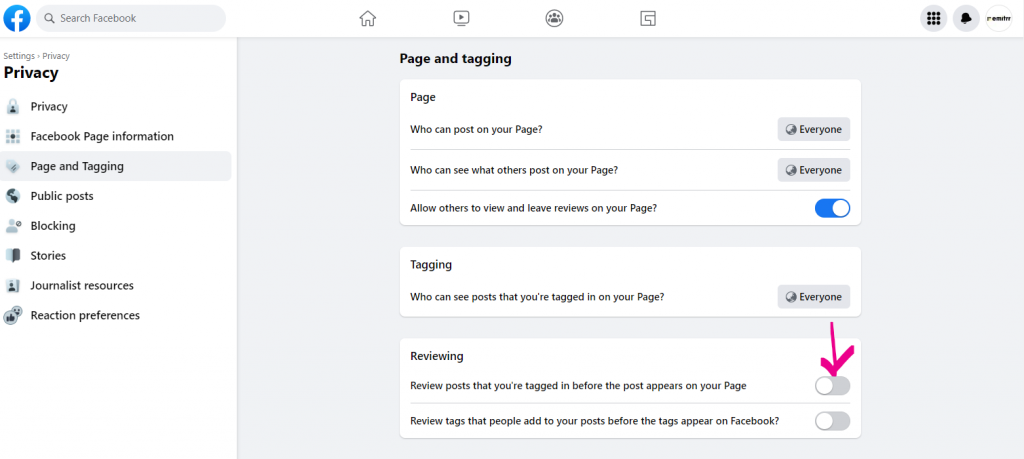
It is quite possible that some customer, or any media platform mentions your business in a Facebook post. This could be for an in length review or any recent piece of news about your product or service. These content pieces require that they be reviewed by you before your audience gets to see them. Therefore reviewing a tag is a step in the right direction. Here’s how you can review tags on Facebook.
Open your Facebook Business Page profile
Tap on the three dots on the right corner
Select Page and Tagging settings
4. Under the ‘Reviewing’ section toggle on ‘Review posts that you’re tagged in before the post appears on your Page’ and/or ‘ Review tags that people add to your posts before the tags appear on Facebook’
How to generate a Facebook review link?
According to a study by Brightlocal, 67% of consumers will consider leaving a review for a positive experience, while 40% will consider leaving a review for a negative experience. A crossover of 33% will consider both. While the 67% might get us excited, one thing we shouldn’t overlook is that this is the number of consumers that would ‘consider’ leaving a review. What we’re trying to point out is that these customers will leave a review only if prompted. As a business owner, being proactive with review collection is of paramount importance. To help give your customers a nudge you can send them an email or text message with a direct review link. This will make it easier for them to leave a review. You can accomplish this by using a software like Emitrr, which helps manage and collect reviews. Read more here. So how do you get a review link to add to your review campaign? Follow these steps:
1. Keep the login homepage URL as www.facebook.com/login/. 2. Add ‘next’ to put a redirect to the reviews page 3. Convert the page URL into its HTML counterpart and add it after ‘next’.
How to remove reviews from Facebook?
It’s possible for your business to be a victim of a fake review on its Facebook page. This review could be spam posted by your competitors and could be purely malicious in its intent. These types of reviews should be filtered out as they do not reflect the true nature of your product/service. So then how can you remove or report this particular nasty review?
Unfortunately, you cannot remove or completely delete a review from Facebook. But what you can do is report it! Follow these steps to report a fake review on Facebook.
Go to your Facebook business page’s profile and select ‘Reviews’ on the top navigation panel.
A list of all reviews will appear. Select the three dots corresponding to the review you wish to report. Before you report, comment on the review as Facebook recommends that you comment on the review before you report it. (Learn how to respond to a negative/fake review here)
Next, select ‘Report Post’
You will be promoted to select the reason why you reported the post. Select Spam.
Facebook will now review the post and remove it if they find it to be a spam.
How to get more reviews on Facebook?
As discussed in the sections above, generating and managing reviews on Facebook is pretty straightforward. Given Facebook’s global reach, businesses need to leverage its power. Learn how you can generate more reviews for your Facebook business page in our full-length article everything you need to know about facebook reviews.
Conlusion
Businesses must encourage their customers to leave a Facebook review. The process of receiving a review starts from the business’s end. From allowing reviews on their Facebook page to creating a review generation link to send to customers, to reviewing tags, all these make up an important part of the process of collecting and monitoring reviews. Reviews and recommendations help the business build a trustworthy image to their customers, it surely should be a top priority!



 4.9 (400+
reviews)
4.9 (400+
reviews)